Add a subscription from a receipt in Subscriptions Tracker
Instead of typing a subscription in by hand, upload the receipt and let it fill in the form for you.
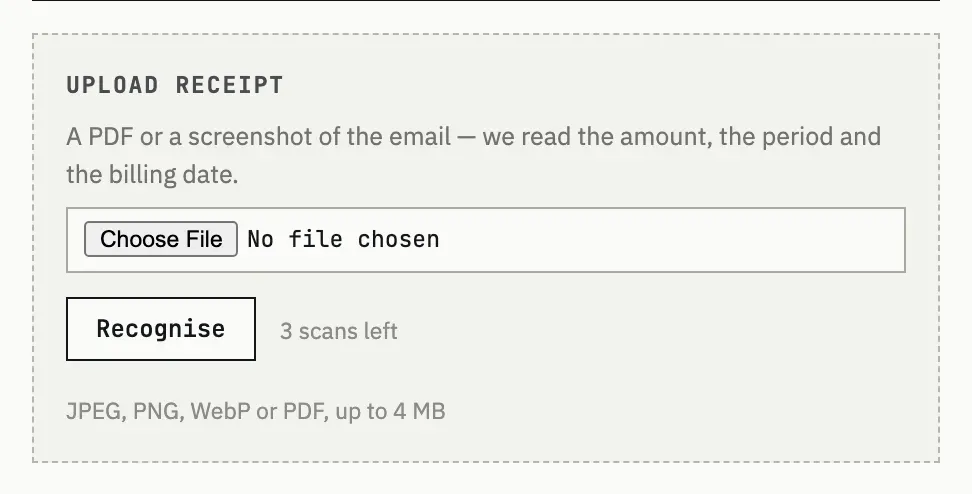
What to upload
Section titled “What to upload”On the New subscription form, the Upload receipt panel takes a receipt email saved as a file, or a screenshot — JPEG, PNG, WebP or PDF, up to 4 MB. The file is read by an AI model to pull out the amount, currency, billing period and next charge date; only fields the document actually states are filled in, and everything else is left for you to enter.
Checking before you save
Section titled “Checking before you save”Press Recognise. The fields it could confidently read are filled in below the panel, with a note listing which ones came from the document — check them, adjust anything wrong, fill in the rest, and save as usual. Nothing is saved automatically just from recognising a file.
Credits
Section titled “Credits”Each recognition spends one credit. Every account starts with 3 free scans that never expire; once they run out, further recognitions need a purchased pack of 10 for €3, bought as a one-time top-up from your fewbase.com account. Manual entry has no credit cost at all — credits are only for the receipt-recognition step.
Recognition got the price wrong
The model reads the total actually charged, including tax, from what the document states — it does not invent a number. If the document itself is unclear or the amount printed is not the recurring charge, correct the Cost field by hand before saving; recognition still saved you from typing the rest.
I’m out of scans
The Upload receipt panel shows a Top up link once credits reach zero, taking you to your fewbase.com account to buy another pack of 10. Adding the subscription by hand costs no credits.