Sending an invoice by public link in Invoices
Sending a document does not attach a PDF to the email — it emails a link to the document’s public page, which renders the same sheet the PDF shows.
Send to client
Section titled “Send to client”Send to client (or Issue and send on a draft) requires the client to
have an Email on file; without one, sending is refused. The client sees
it arrive from fewbase <info@fewbase.com>, the shared sender for every
fewbase product — worth whitelisting — but replies go to your own address
from Settings, reaching you directly, not fewbase. Resending within 10
minutes of the last send is refused, to stop repeated clicks from spamming
one address.
The public page
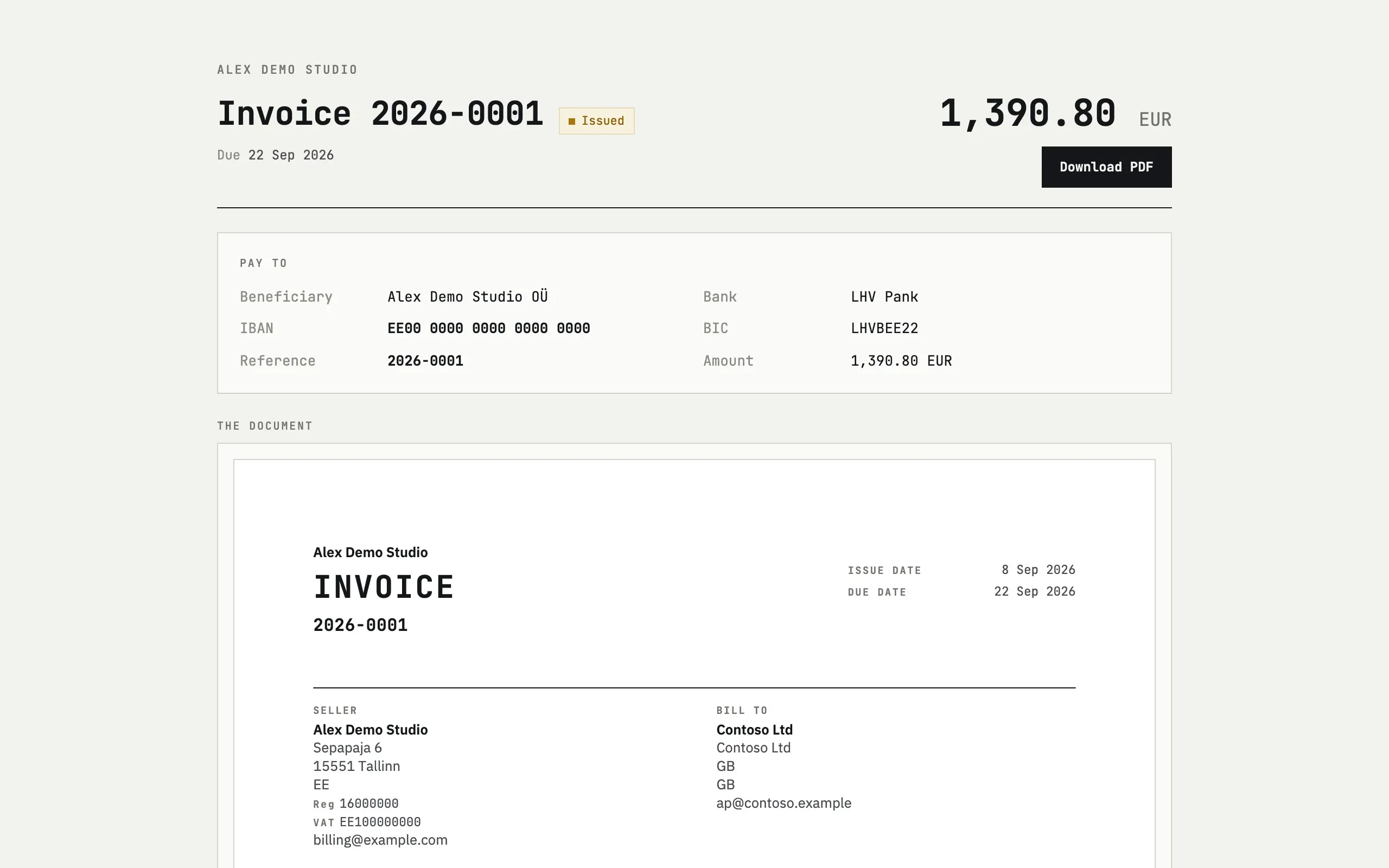
Section titled “The public page”The link opens at /p/<token> without an account. It shows the status, due
date, a Download PDF button and, for an issued invoice whose theme
prints bank details, a Pay to block with the beneficiary, IBAN, BIC and
the amount — the same details as the sheet.
Opening the page marks the document as first viewed — a card meta line switches from Not opened yet to First opened with the date. Fetching the PDF directly does not count as opening it, since PDF links get fetched by mail scanners too.
Revoke link
Section titled “Revoke link”Revoke link replaces the token: the old link (already sent, already printed as a QR code on a downloaded PDF) stops working, and any new PDF carries a fresh QR pointing at the new link.
The client says the link is dead
If the link was revoked, that is expected — the old token no longer resolves. Open the document and use Send to client again, or copy the current public link shown on the card; the previous one cannot be revived.
Will opening the link myself mark it as viewed?
Yes. The link on the card is plain text so opening it yourself doesn’t happen by accident — it sets the “first opened” mark just like a client visit. Copy it into the email or chat instead of clicking it.