Cookie banner for a small website: what EU law requires, and what it does not
When a small website needs a cookie banner under EU rules, what a valid banner must do, and what you can skip. With links to the law and the EDPB.

The cookie banner is the most annoying part of the web. It is also one of the most confusing parts for the people who build websites. Do you need one at all? If you do, what kind? Can you just write “By using this site you agree to cookies” and move on?
We had to answer these questions when we built Consent, our cookie banner for small sites. You can see it working on fewbase.com, because we use it on our own site. Below is what EU law and the European data protection authorities actually say. We only use primary sources: the directive, the GDPR, the EU Court of Justice and the European Data Protection Board (EDPB).
This is not legal advice. If your case is complex, talk to a lawyer.
The main rule fits in one sentence
It comes from Article 5(3) of the ePrivacy Directive. You may store information on a visitor’s device, or read information from it, only with the visitor’s consent, and you must first explain clearly why (Directive 2002/58/EC).
Two things follow from this:
- It is not only about cookies. The EDPB says the rule also covers “similar technologies”: tracking pixels, tracking data in links, reading device identifiers, and fingerprinting (EDPB Guidelines 2/2023).
- It does not matter whether the data is personal or not. The EU Court of Justice said so in the Planet49 case (C-673/17).
When you do not need consent
The rule has two exceptions. You do not need consent when storing or reading is needed only to send data over the network, or when it is strictly necessary to give the visitor a service they asked for (Article 5(3)).
In a 2012 opinion, the EU data protection authorities listed what usually fits here (WP29 Opinion 04/2012):
- a session after the visitor logs in;
- a shopping cart, or a form that spans several pages;
- security cookies, for example against password guessing;
- load balancing between servers;
- short lived cookies for settings the visitor chose, like the language.
The EDPB adds cookies that remember the visitor’s own choices, and that includes the answer to the cookie banner itself (EDPB Cookie Banner Taskforce report, para 30).
What does not fit: “remember me” logins that last across visits, ads, remarketing and analytics.
So if your site uses only these technical cookies, you do not need a consent banner. You should still describe them in your privacy policy.
Analytics is the most common trap
Many people think of analytics as “necessary”. EU regulators disagree. The site owner needs visit statistics, but the visitor did not ask for them. So analytics cookies do not fit the exception, and they need consent (WP29, section 4.3). The Estonian Data Protection Inspectorate (AKI) also lists analytics cookies as extra cookies that need prior consent (aki.ee).
Some countries have their own exceptions. For example, the French regulator CNIL allows audience measurement without consent under strict conditions: only your own statistics, no matching with other data, a shortened IP address, and a lifetime of no more than 13 months (CNIL). But that is a French rule, not an EU one.
What a valid banner looks like
If you need consent, the banner has clear requirements.
Nothing runs before the choice
Cookies that need consent cannot be set until the visitor clicks a button. Consent must be an active action (Taskforce report, para 7).
Scrolling is not consent
Scrolling, swiping or “just continuing to use the site” is never consent (EDPB Guidelines 05/2020, para 86). The line “By continuing, you agree” does not work.
No boxes ticked in advance
The EU Court of Justice ruled this out in the Planet49 case.
Saying no is as easy as saying yes
Most European data protection authorities see it as a breach when a banner has an “Accept” button but no “Reject” button on the same screen (Taskforce report, para 8). The reject option should not hide as a pale link, and the design should not push people toward “Accept”.
A choice for each purpose
A visitor should be able to allow analytics and refuse ads, instead of accepting everything as one package (Guidelines 05/2020, para 42).
A clear explanation
Tell visitors what the cookies are for, how long they last, and whether third parties can access them. This also comes from the Planet49 ruling.
No cookie wall
You cannot block the site until a person agrees (Guidelines 05/2020, para 39).
No “legitimate interest”
For cookies under Article 5(3), the site owner’s legitimate interest is not a valid legal basis (Taskforce report, para 24).
Changing your mind at any time
Withdrawing consent must be as easy as giving it (GDPR, Article 7(3)). The EDPB suggests, for example, a small icon that stays visible on the page (Taskforce report, para 32).
You must be able to prove consent
The law does not literally say “keep a consent log”. But the site owner must be able to prove that consent was given (GDPR, Article 7(1)). The EDPB explains that pointing to a “correctly configured website” is not enough. You need a record of when and how consent was given. At the same time, you should not collect more data than you need for that (Guidelines 05/2020, paras 106 to 108).
If you use Google ads, Google’s own policy also asks you to keep records of consent (EU User Consent Policy).
Google Consent Mode v2, if you use Google Analytics or Ads
Consent Mode tells Google tags what the visitor agreed to. In November 2023
Google added two new parameters, ad_user_data and ad_personalization, to
the older ad_storage and analytics_storage. This version is called v2
(Google).
For visitors from the European Economic Area, Google asks you to collect
consent and send these signals. Without them, measurement, ad personalization
and remarketing stop working
(Google Ads Help).
What if your site is not in the EU?
The GDPR also applies to companies outside the EU when they offer goods or services to people in the EU, or monitor their behavior there (GDPR, Article 3(2)). The fact that people in the EU can open your site is not enough on its own. What matters is who the site is for: the language, the currency, mentions of customers in the EU (EDPB Guidelines 3/2018).
Checklist
- List every cookie and script on your site: analytics, ads, chat widgets, embedded videos, pixels.
- Only technical cookies? You do not need a consent banner. A privacy policy is enough.
- Analytics or ads? You need a banner.
- Nothing runs before the visitor chooses.
- “Accept” and “Reject” on the first screen, equally visible.
- A choice for each category, with no boxes ticked in advance.
- An explanation: why, for how long, and whether third parties get access.
- The visitor can change the choice at any time.
- Choices are recorded, without extra personal data.
- Google Analytics or Ads? Consent Mode v2 is connected.
How we did it ourselves
We built Consent, a banner for small sites that follows this list by default.
One line of code
You add one line to your site. Everything else is set in the dashboard on fewbase.com.
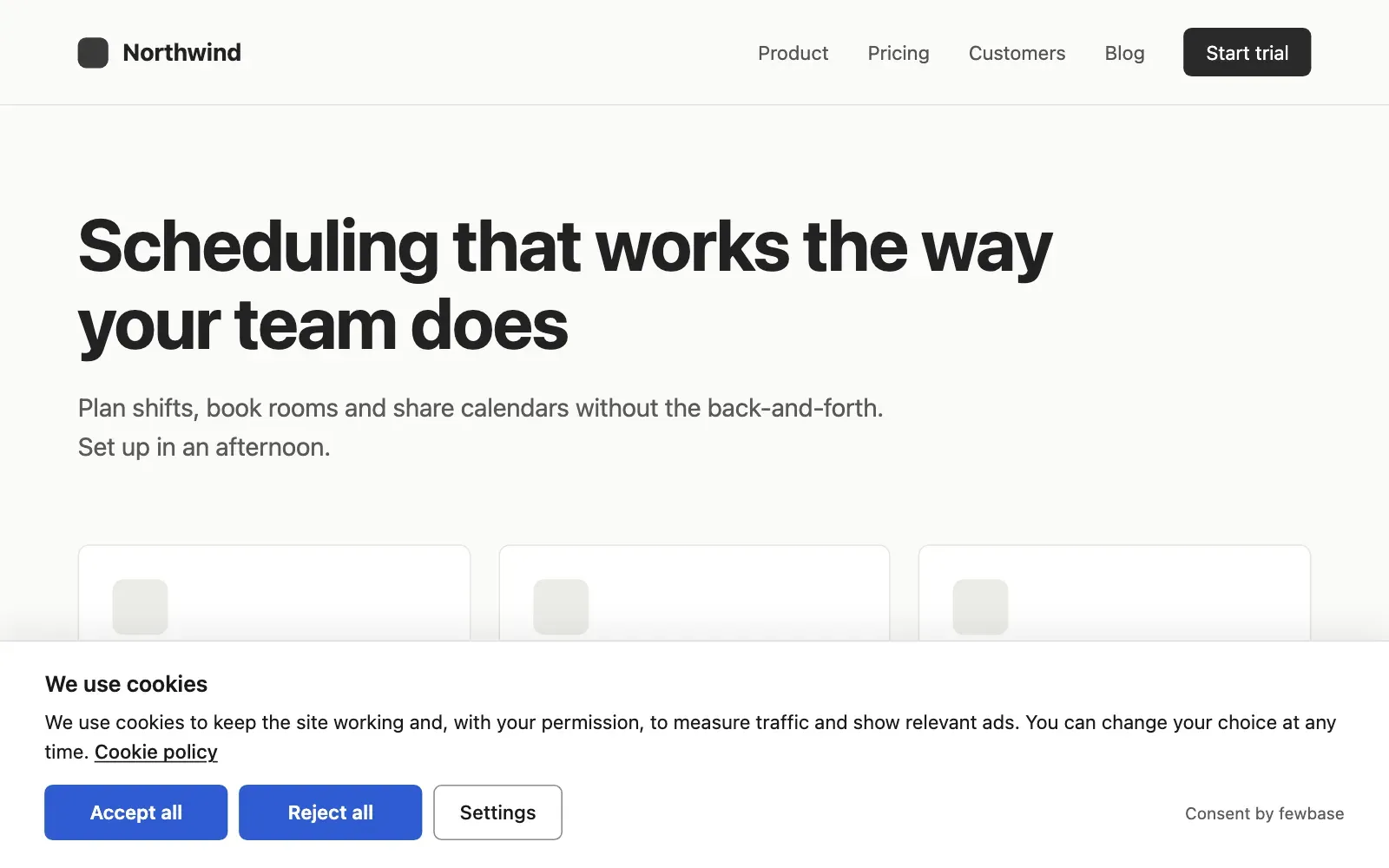
Accept and reject look the same
“Accept all” and “Reject all” have the same color and size, with “Settings” next to them. Nothing is selected in advance.
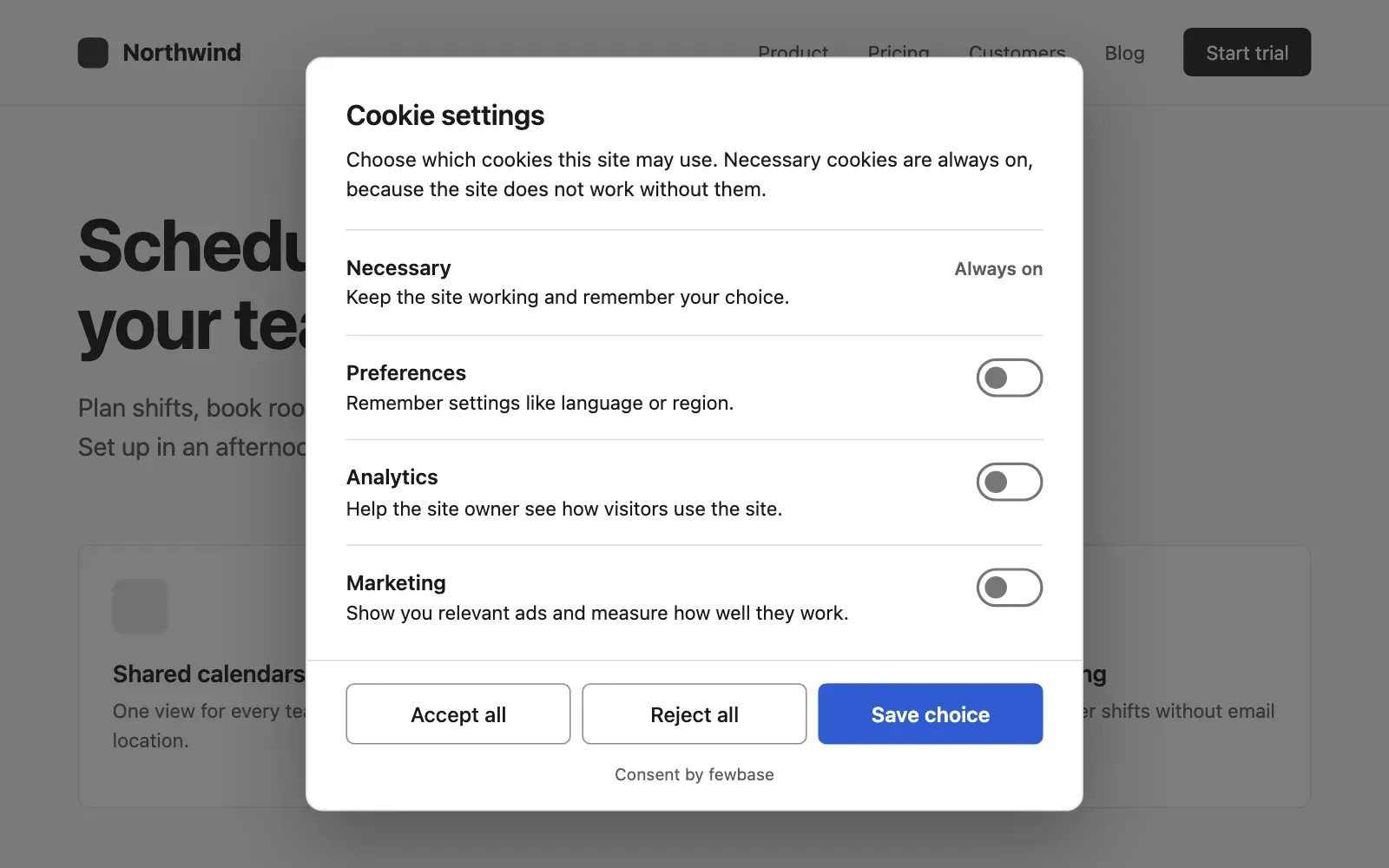
Four categories
Necessary, preferences, analytics and marketing. Under each one, the visitor sees the services you connected to it.
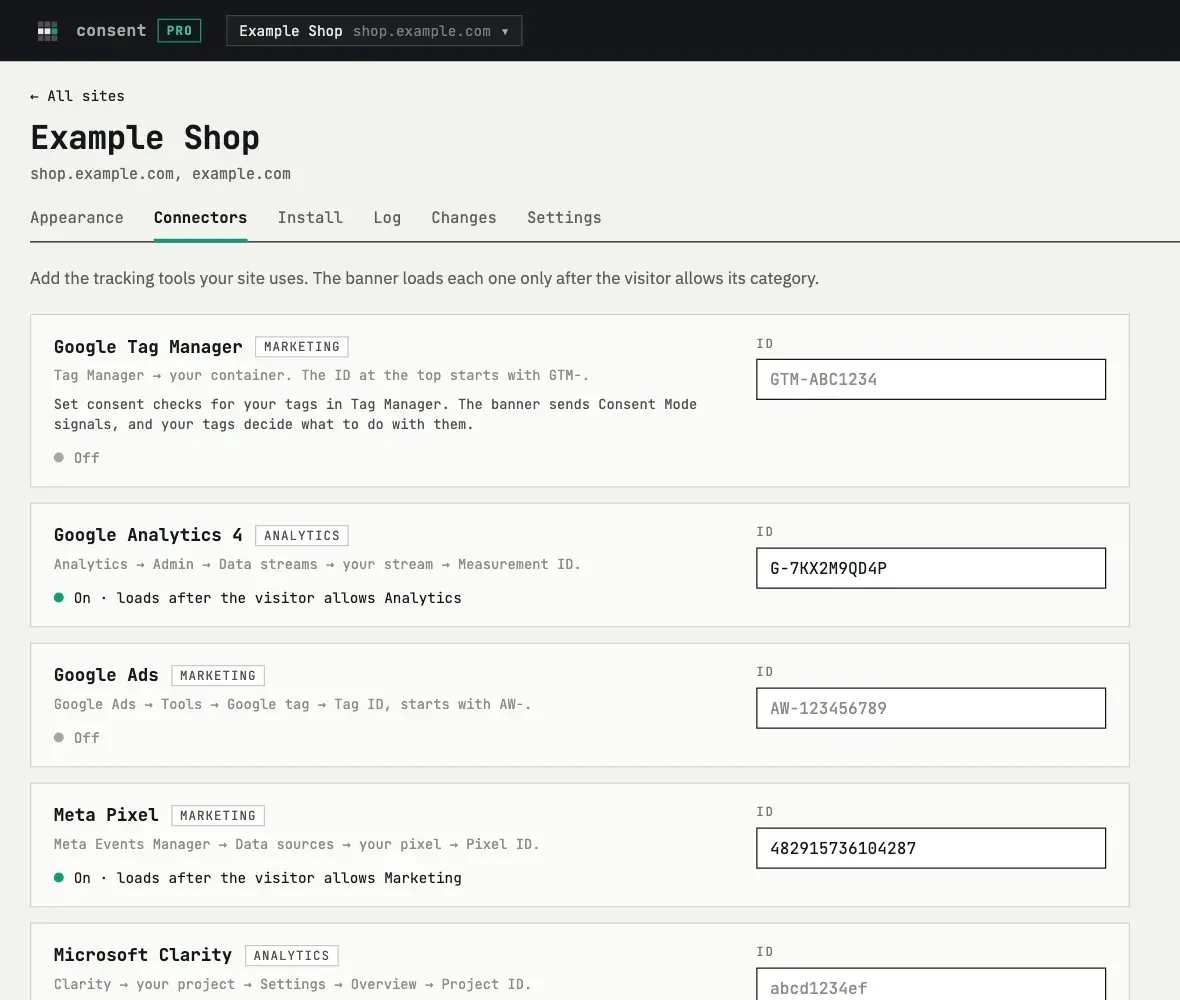
Tools stay off until the visitor chooses
You connect Google Tag Manager, GA4, Google Ads, Meta Pixel and Microsoft Clarity by their ID, and you can add your own scripts. Consent Mode v2 is built in.
A way back
After the choice, a small button stays in the corner of the page. It opens the settings again, so the visitor can change their mind.
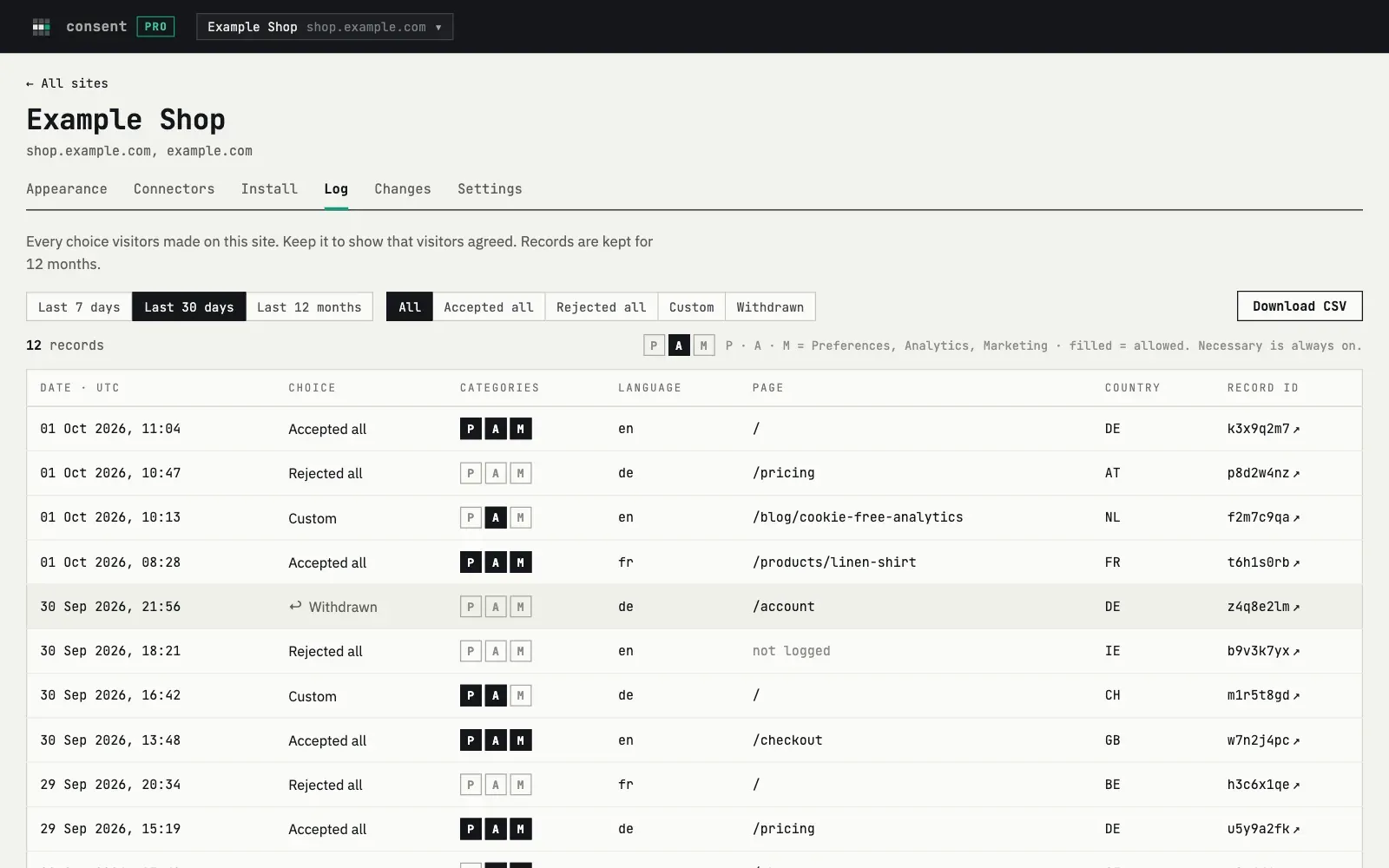
A consent log
Each record has the date, the choice, the categories, the language, the page and the country. There are no IP addresses, names or emails. You can export the log as CSV.
Your language and your look
The banner speaks 26 languages, has a light and a dark theme, and you can write your own texts.
To be fair about what Consent does not do: it does not scan your site. A script that you did not connect or mark will run as before. So after you add the banner, check your pages.
You can start for free.
